GEOMETRY data type
H2GIS can handle GEOMETRY geospatial datasets.
Supported geometry types
H2 database and H2GIS supports the following geometry types:
GEOMETRY: any kind of geometries, without any constraints,POINT: a geometry that represents a location in space (dimension = 0),LINESTRING: a linear geometry made of points connected thanks by segments (dimension = 1),POLYGON: a surfacic geometry made of points connected by segments and where the last point is equal to the first one (the polygon has to be closed). By definition aPOLYGONhas an exterior boundary and between O and n interior boundaries (holes) (dimension = 2),MULTIPOINT: a complex geometry, made of a set ofPOINT’s,MULTILINESTRING: a complex geometry, made of a set ofLINESTRING’s,MULTIPOLYGON: a complex geometry, made of a set ofPOLYGON’s,GEOMETRYCOLLECTION: a set of simple and/or complex geometries (POINT,LINESTRING,POLYGON,MULTIPOINT,MULTILINESTRINGandMULTIPOLYGON).
Supported coordinates
For each of the geometry types, H2 database and H2GIS supports the following geometry coordinates:
2D :
X YZ :
X Y ZM :
X Y MZM :
X Y Z M
Projection management
H2 database and H2GIS allows to manage SRS (Spatial reference system) thanks to the specification of SRID (Spatial Reference System Identifier) constraint on geometries.
To do so, user just have to add the SRID after the geometry type when creating a table.
Example : GEOMETRY(POINT Z, 4326)
See some dedicated H2GIS functions here.
Table creation examples
Here are some examples to create a table named myTable in which we have two columns : the geometry the_geom and a unique identifier (Primary Key) id:
CREATE TABLE myTable(the_geom GEOMETRY, id INTEGER PRIMARY KEY);
The same but with adding some constraints on geometry and SRID:
With various geometry types
CREATE TABLE myTable(the_geom GEOMETRY(POINT), id INTEGER PRIMARY KEY);
CREATE TABLE myTable(the_geom GEOMETRY(LINESTRING), id INTEGER PRIMARY KEY);
CREATE TABLE myTable(the_geom GEOMETRY(MULTIPOLYGON), id INTEGER PRIMARY KEY);
CREATE TABLE myTable(the_geom GEOMETRY(GEOMETRYCOLLECTION), id INTEGER PRIMARY KEY);
With the various coordinates
CREATE TABLE myTable(the_geom GEOMETRY(POINT), id INTEGER PRIMARY KEY);
CREATE TABLE myTable(the_geom GEOMETRY(POINT Z), id INTEGER PRIMARY KEY);
CREATE TABLE myTable(the_geom GEOMETRY(POINT M), id INTEGER PRIMARY KEY);
CREATE TABLE myTable(the_geom GEOMETRY(POINT ZM), id INTEGER PRIMARY KEY);
With SRID
CREATE TABLE myTable(the_geom GEOMETRY(POINT, 4326), id INTEGER PRIMARY KEY);
CREATE TABLE myTable(the_geom GEOMETRY(MULTIPOLYGON ZM, 2154), id INTEGER PRIMARY KEY);
Using geometries on the fly
H2 database and H2GIS allows you to manipulate geometries on the fly in a query, using a quoted string (’ ‘), containing a WKT/EWKT formatted chain.
Examples
Generate a POINT in a SELECT:
SELECT 'POINT(348238.151 6683011.940)'::GEOMETRY;
Note that: we are using :: symbol to cast the string chain POINT(348238.151 6683011.940) into a geometry, so that it can be interpreted by H2/H2GIS.
Since the coordinates are here in Lambert 93 - EPSG:2154, we can force the SRID in the same time:
SELECT 'SRID=2154; POINT(348238.151 6683011.940)'::GEOMETRY;
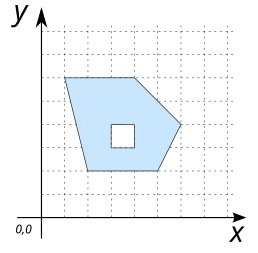
Generate a POLYGON (having a hole) in a SELECT.
SELECT 'POLYGON((2 2, 5 2, 6 4, 4 6, 1 6, 2 2), (3 3, 3 4, 4 4, 4 3, 3 3))'::GEOMETRY;
In this example, we want to select the houses that are at a certain distance from a point, which is defined on the fly in the query (not stored before in a table).
Creation of the table
HOUSESin which we store 4 houses:
DROP TABLE IF EXISTS HOUSES;
CREATE TABLE HOUSES (id INTEGER PRIMARY KEY, the_geom GEOMETRY(POINT));
INSERT INTO HOUSES (id, the_geom) VALUES
   (1, 'POINT(1 1)'), (2, 'POINT(2 2)'), (3, 'POINT(1 4)'), (4, 'POINT(4 4)');
We can now select the houses that are less than 2 meters from a
POINT(3 3):
SELECT a.* FROM HOUSES h, (SELECT 'POINT(3 3)'::GEOMETRY the_geom) p
   WHERE ST_Distance(h.the_geom, p.the_geom)<2;
Answer:
ID |
THE_GEOM |
|---|---|
2 |
POINT(2 2) |
4 |
POINT(4 4) |

Compatibility with PostGIS
H2 database and H2GIS allows you to define your geometries in two ways: with or without spaces:
POINT Z=POINTZLINESTRING M=LINESTRINGMPOLYGON ZM=POLYGONZM…
In both cases, H2 and H2GIS will return a geometry with space. E.g
SELECT ST_Force3DM('POINT Z (-10 10 12)',10);
-- or
SELECT ST_Force3DM('POINTZ (-10 10 12)',10);
Returns in both cases POINT M(-10 10 10).
At the same time, PostGIS only accepts signatures without spaces (see).
So, if you plan to make your .sql instructions compatible with PostGIS, make sure you don’t use spaces when defining your geometries.